
Colours
Always use the official colours of GOV.GR.
Themes and variables
GOV.GR uses two themes: the light, which is the default, and the dark theme. The colour palette is being adjusted to each theme.
If you are using @digigov/css, use the variables provided instead of the
hexadecimal colour values directly. For example, you can write CSS rules like
background-color: var(--color-primary); that use CSS variables.
Alternatively, if you choose to use our Tailwind plugin, you can get the same
results with the bg-primary class. Both of these solutions, avoid using the #003375 colour value directly. This way your service will always use the latest changes in our colour palette whenever you update your @digigov/css version.
Primary colours
Color Primary 100
--color-primary100#1F4884Color Primary 200
--color-primary200#003375Color Primary 300
--color-primary300#00225EColor Primary
--color-primary#003375The primary colour of the GOV.GR brand is used exclusively in the Header.
Secondary colours
Primary
--color-secondary100#61C9FFColor Secondary 200
--color-secondary200#00B0F0Color Secondary 300
--color-secondary300#009CD8Color Secondary
--color-secondary#00B0F0Color Tertiary 100
--color-tertiary100#3379C1Color Tertiary 200
--color-tertiary200#0065B3Color Tertiary 300
--color-tertiary300#00559EColor Tertiary
--color-tertiary#0065B3The secondary colour of the GOV.GR brand is used in the horizontal dividers in the Header and Footer.
You can also use the secondary colour as a background in masthead component.
Status colours
Success
Color Success
--color-success#006736Color Success Hover
--color-success-hover#154A2BUsed the success colour as background colour in the following cases:
- Main call-to-action buttons
- In the confirmation of a complete process
Error
Color Error
--color-error#B60202Color Error Hover
--color-error-hover#880000The error colour should be used in cases of error or unwanted result, e.g. wrong phone format in one input or another validation error.
For this reason, it should only be used in the following cases:
- In the form fields in case of error
- To recover from possible errors in the logic of the system
Focus
Color Focus
--color-focus#FFDD00Only use the focus colour to indicate which element is focused on. For example, when a user tabs to an element with their keyboard.
Typography colours
Typography
Color Base Content
--color-base-content#252830Color Base Content Secondary
--color-base-content-secondary#6D6A71Color Base Content Invert
--color-base-content-invert#FEFEFEColor Accent
--color-accent#252830Color Accent Focus
--color-accent-focus#32363DColor Accent Content
--color-accent-content#FEFEFELinks
Color Link
--color-link#0054BAColor Link Hover
--color-link-hover#0E3D8BColor Link Active
--color-link-active#252830Color Link Visited
--color-link-visited#4C2A90Base colours
Color Base 100
--color-base100#FEFEFEColour Focus
--color-base200#ECEBECColor Base 300
--color-base300#CDCCCEColor Base 400
--color-base400#B3B2B5Color Base 500
--color-base500#99989CColor Base 600
--color-base600#828086Color Base 700
--color-base700#6D6A71Color Base 800
--color-base800#515058Color Base 900
--color-base900#32363DColor Base 1000
--color-base1000#252830Color Base 1100
--color-base1100#14161BColor White
--color-white#FEFEFEColor Black
--color-black#14161BAdvanced knowledge
Glossary
Tint: A lighter value of a color.
Shade: A darker value of a color.
Color index: A numerical representation of a color token’s position in a list of available tints and shades (e.g., the 500 in blue-500 represents the fifth color).
Contrast ratio: The measurable difference in lightness between two comparative color values using the WCAG relative luminance formula.
Target contrast ratio: The desired contrast ratio between two color values when one of the color values is generated by a color tool.
Contrast-generated colors
GOV.GR color themes should be generated using target contrast ratios with a specified background color. Certain color tokens' values are generated with confidence that they will meet or exceed specific WCAG AA contrast minimums.
According to webaim, the visual presentation of text and images of text has a contrast ratio of at least 4.5:1, except for the following:
- Large Text: Large-scale text and images of large-scale text have a contrast ratio of at least 3:1;
- Incidental: Text or images of text that are part of an inactive user interface component, that are pure decoration, that are not visible to anyone, or that are part of a picture that contains significant other visual content, have no contrast requirement.
- Logotypes: Text that is part of a logo or brand name has no contrast requirement.
As the color token name increases in number (e.g., blue-700, blue-800, blue-900), the color value’s contrast with the background also increases. Because of this, colors progressively get darker in light theme and lighter in dark themes.
Color System
Grays
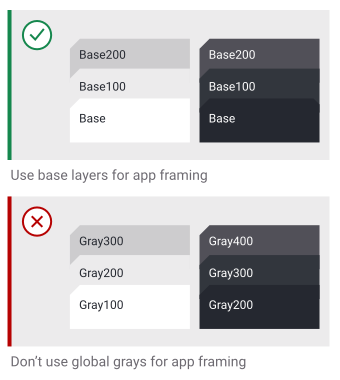
Each color theme uses gray-100 (white) as the default background color. The color value for gray-100 is different per color theme. GOV.GR generates all other gray color values by target contrast ratios with the background color value. Grays are designed to provide optimal contrast for text and icon content in the interface.
Grays 100 through 300 are used for background layers.
Colors
GOV.GR uses 5 colors per color theme with a set of 7 tints and shades per color. Colors are used sparingly and intentionally to reinforce hierarchies and to create clear modes of communication. Using too much color can be visually overwhelming and impacts user experience.
Use semantic colors to clearly and predictably communicate with a component’s appearance.
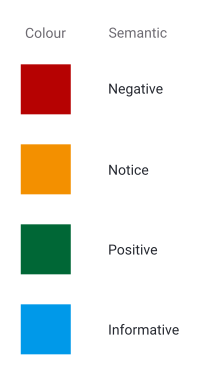
Static color palette
Static colors have consistent color values across all themes and are not based on contrast with the background color of the theme. These are used when the identifiability of color's hue is a high priority, to ensure that a lighter color (such as yellow) remains a light value regardless of the theme.
Using color
Colors for interactive states
Theme-specific colors get darker in light themes and lighter in dark themes for each state.

Create hierarchy with background layer colors
Use base layers for creating application hierarchy.
All the colours consisting the GOV.GR colour palette.
Main colours
The colour palette we use follows the wider branding of Gov.gr. We also use colour to help users prioritise and differentiate information. For example:
- yellow for our focus states
- red as a warning colour
- green to confirm something
Extended Palette
Use these colours for supporting materials like illustrations, or in custom components where appropriate.